

Working with Open Government data
Go to Open Government to access the full benefits, including greater transparency, flexibility, and collaboration.
On this page
We publish two main types of information:
- Who we regulate (WWR) is a public listing of federally regulated financial institutions. It serves as a reference and contact directory, not a financial reporting tool. We update this information on the first of each month.
- FINDAT on Open Government contains regulatory returns filed by institutions, representing financial data approved by Parliament for public disclosure. We publish monthly data on the 15th of each month, and quarterly data in late May, August, November, and March.
Whether you are a first‑time user or an experienced analyst, these tools and resources are designed to help you get the information you need—quickly and confidently.
Each dataset includes:
- A data dictionary explaining each column and row
- A user manual explaining the structure and key data elements
- A guide explaining how to access via Application Programming Interface (API)
If you are new to data analytics, free tutorials for Excel or Power BI are widely available online.
Step 1: User manual
Download a user manual to help guide you (requires MS Word):
- Banks - User manual
- Foreign bank branches - User manual
- Trust companies - User manual
- Loan companies - User manual
- Retail associations - User manual
- Life insurance companies - User manual
- Fraternal benefit societies - User manual
- Property and casualty companies - User manual
Step 2: Open the dataset you need
Jump to one of our most popular sets:
- Banks - M4 - Consolidated Balance Sheet (Active)
- Banks - P3 - Consolidated Statement Of Income, Retained Earnings & AOCI (Active)
- Banks - BA – BASEL III Capital Adequacy Reporting - BCAR (Active)
- Life insurance companies - LCA - LICAT (Active)
- Life insurance companies - LF1 - Life Core Financial Statement Return (Active)
- Property and casualty companies - PC1 - P&C Core Financial Statement Return (Active)
- Foreign bank branches - P3 - Consolidated Statement Of Income, Retained Earnings & AOCI (Active)
Step 3: Viewing the data you need
Click Add Filter button to focus on a specific institution (total), overall totals (measure value), or reporting period.
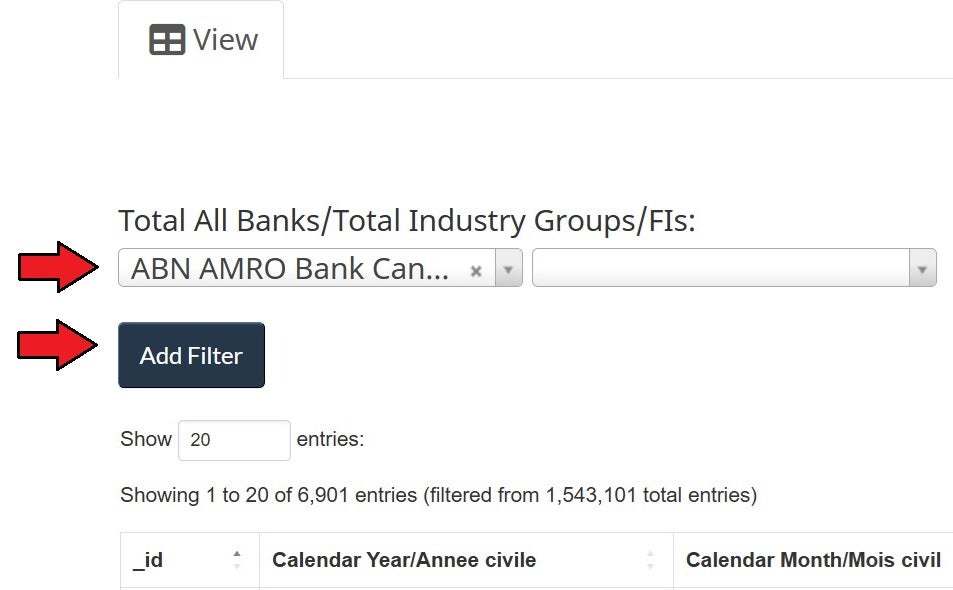
Also, hide the columns you don't need

Step 4: Save and share your results for future reference
Download filtered results to see only the portion of the dataset that you need

Share the current view with others

If you still have questions, please contact us.